

Browse. Hear. Drop.

cueMIDI is a MIDI browser plugin for your DAW. Browse your own MIDI library, preview files through the instrument of your choice, and drop the right idea straight into your project.

Limited-time introductory pricing. Regular price: $29 / €29, with regional pricing in other currencies.

incl. VAT where applicable

Try the Demo:

Use the same installer to try cueMIDI, then unlock the full version with your serial number. No reinstallation required.

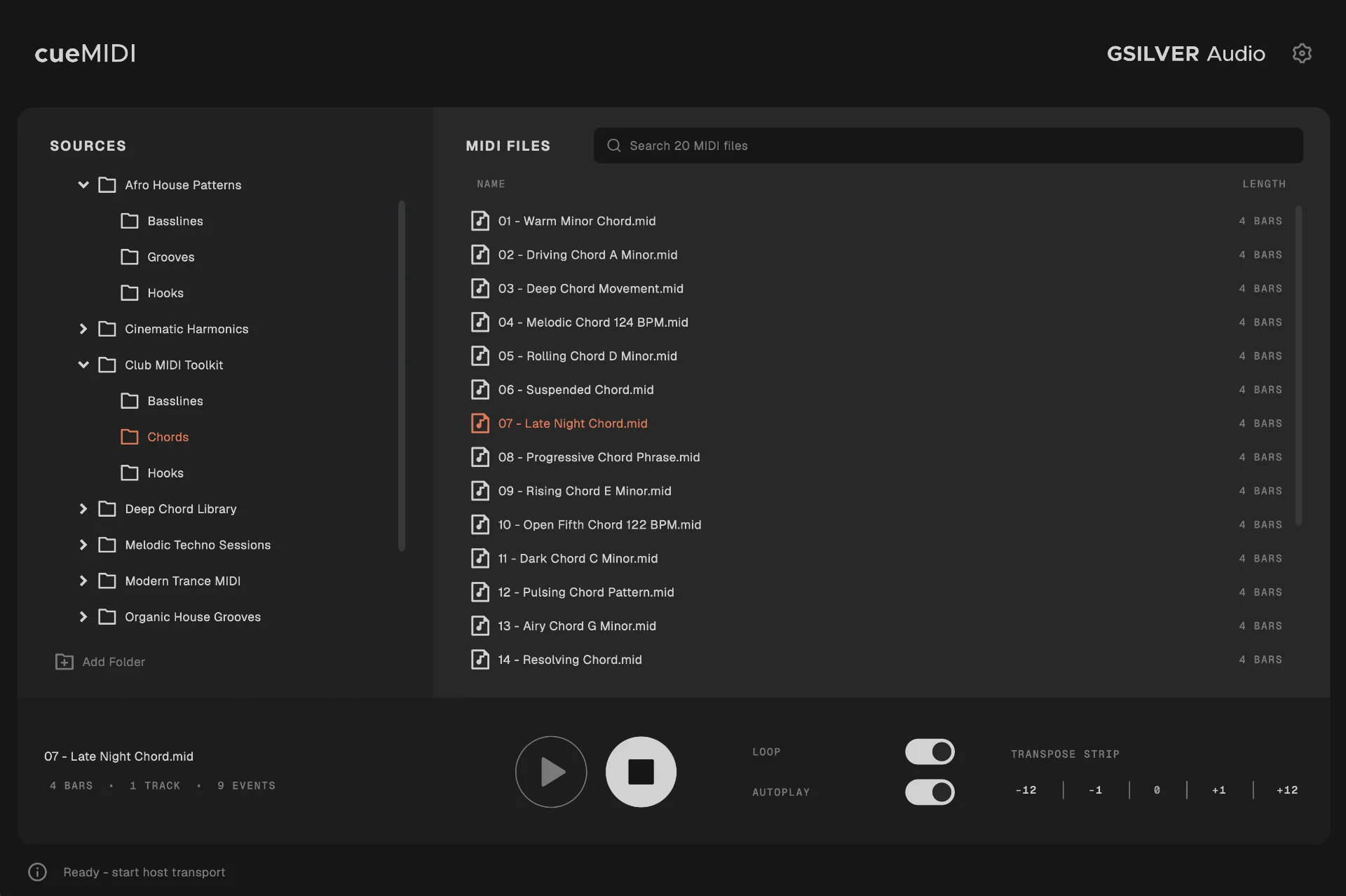
cueMIDI browsing a MIDI library, with file list, transport, and transpose controls

WHAT cueMIDI DOES

Your MIDI library, inside your DAW workflow.

cueMIDI lets you browse your own MIDI folders, hear files through the instrument already loaded in your project, and drag the right idea straight into your DAW.

  • Browse your own MIDI libraries
  • Preview through your DAW instrument
  • Stay in sync with your project
  • Transpose before you commit
  • Drag & drop directly into your DAW

BROWSE

Find the MIDI you already own.

Add the folders you already use and browse them directly inside cueMIDI. Your existing folder structure stays intact, with recursive browsing and global search making even larger libraries quick to navigate.

No importing, tagging or reorganizing required. Point cueMIDI at your folders and start browsing.

Browse MIDI folders in cueMIDI

HEAR

Hear it through your actual instrument.

A MIDI file only becomes meaningful when you hear it with the sound you are actually working with. cueMIDI sends the preview through your DAW instrument and keeps playback in sync with your project.

Transpose the preview when needed and find out immediately whether an idea belongs in the track.

Preview MIDI through the current DAW instrument with cueMIDI

DROP

Drop it straight into your project.

Found the right idea? Drag the MIDI directly from cueMIDI into your DAW and keep working.

cueMIDI removes embedded tempo and time-signature events during drag & drop, so imported MIDI doesn't unexpectedly change your project's tempo or meter.

Drag MIDI directly from cueMIDI into the DAW

BUILT FOR ONE JOB

We chose what not to build.

cueMIDI exists because browsing MIDI in the middle of a session shouldn't become another job.

It doesn't generate MIDI, build a database or ask you to reorganize your library. It does one thing: helps you find the MIDI you already have, hear it with the instrument you're actually using, and get it into the project when it works.

  1. 01

    No database to manage. No generated content. No extra workflow to learn.

  2. 02

    Browse. Hear. Drop.

Get cueMIDI

Simple. One-time. Yours.

One-time purchase. No subscription.

Limited-time introductory pricing. Regular price: $29 / €29, with regional pricing in other currencies.

incl. VAT where applicable

Buy cueMIDI

Try the Demo:

Use the same installer to try cueMIDI, then unlock the full version with your serial number. No reinstallation required.

Product information

Everything you need to know.

cueMIDI is designed to work across modern DAW workflows.

System requirements

  • macOS

    Apple Silicon / arm64

    50 MB hard disk space

    Audio Unit or VST3 compatible host software

  • Windows

    x64

    Windows 11 or newer

    50 MB hard disk space

    VST3 compatible host software

Formats

  • VST3
  • AU MIDI Effect for Logic Pro

Resources

Manuals, downloads and product support are available in the GSILVER Audio support area.

Visit Support →

Current release

cueMIDI 1.3.0

Release notes

cueMIDI 1.3.0 - September 30, 2026

New
  • Added offline license activation using email and serial
  • Added Demo mode with one source folder and the first 10 MIDI files
  • A valid license unlocks additional source folders and subfolders
Improved
  • About now shows Demo or Licensed to with the saved email address
  • License screen now shows the saved email address and masked serial
cueMIDI 1.2.2 - September 29, 2026
Fixed
  • Fixed Note Off cleanup for overlapping notes
  • Improved note cleanup when stopping or restarting preview playback
cueMIDI 1.2.1 - September 29, 2026
New
  • Added Original Channels and Merge to Ch. 1 preview modes
  • Merge to Ch. 1 enables complete multichannel MIDI preview through a single instrument
Improved
  • MIDI channel mode can be changed during playback
  • Selected MIDI channel mode is saved with the plugin state
cueMIDI 1.2.0 - September 25, 2026
New
  • Completely redesigned user interface
  • New visual identity and updated cueMIDI branding
  • Redesigned MIDI browser with improved source navigation
  • New browser header and integrated MIDI search
  • Redesigned MIDI file list for clearer, faster browsing
Improved
  • Refined overall layout, spacing and visual hierarchy
  • Updated color system and interface surfaces
  • Improved consistency across browser, source panel and file rows
cueMIDI 1.1.0 - September 5, 2026
New
  • Windows x64 VST3 support
  • AU MIDI Effect version for Logic Pro
Improved
  • MIDI drag export now strips embedded tempo metadata to avoid unwanted tempo changes in the DAW
  • Updated user manual
  • Improved Windows release packaging and validation
cueMIDI 1.0.0 - August 31, 2026
  • Initial public release of cueMIDI
  • Browse your own MIDI libraries
  • Host-synced MIDI preview through your DAW instrument
  • Transpose previews before committing
  • Drag and drop MIDI directly into your DAW